
Tag Archives: WordPress
Disable Automatic Paragraphs & Line-breaks In WordPress Posts

I’ve mentioned previously that I prefer handwriting code instead of having it done automatically. When I code manually, I get the functionality and presentation exactly the way I want. One such feature in WordPress (I’ve disabled so many) counters my preference by doing something automatically. What I’m referring to is […]
Posted in: Web Development
Tagged: application, code, disable, HTML, PHP, syntax, web, web development, WordPress
Quick Q & A: 3

Here are some quick answers to questions I’ve received from comments, emails, and search queries. You can find Parts 1 & 2 of this segment in the Quick Q & A category. What is “encrypted_search_terms” in WordPress.com Stats plugin? Encrypted_search_terms is reported within the WordPress.com Stats plugin when the search […]
Posted in: Quick Q & A
Tagged: application, Chrome, email, Firefox, Google, Internet Explorer, malware, Opera, operating system, plug-in, Quick Q & A, search, search engine, stats, web, web browser, web development, Windows 7, Windows 8, Windows Vista, Windows XP, WordPress
Prevent WordPress SPAM Comments & Registrations With JavaScript
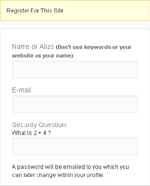
The battle against SPAM continues, so I have another hurdle you can implement to help prevent bots from submitting comments and registering accounts. Although this tip is aimed at WordPress, the basic idea can be applied to any application. What we’re going to do is encase (or hide) the submit […]
RSS Links In Archive-type Pages
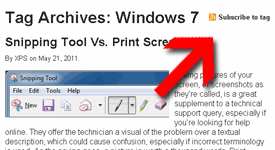
A while back, I adjusted the Feeds List page with basic directions on how to find the RSS feed of a specific category, tag, or author. That would allow readers to subscribe to a specific listing of their choice rather than the whole site feed. While doing that, I had […]
Posted in: Web Development
Tagged: code, HTML, PHP, RSS feed, syntax, web, web development, WordPress
Add Users Total To WordPress Dashboard
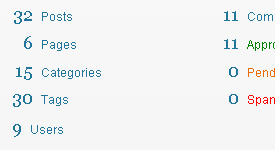
The WordPress Dashboard is the first thing you see when you login. The “Right Now” box has important information like the total number of posts tags, comments, etc. but one thing is missing: users. I usually don’t have a need to check the Users list, so when a number of […]
Disable WordPress Drafts & Revisions

Today’s computer tech tip involves disabling two features in WordPress: Automatic Drafts & Revisions. They’re intended to be helpful, but they’re not for everyone. I would prefer to see these as options to enable/disable within the Admin Dashboard, but hard-coding the changes will suffice for now. I may have mentioned […]