
Tag Archives: syntax
Prevent WordPress SPAM Comments & Registrations With JavaScript
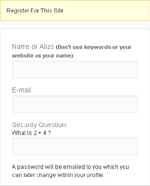
The battle against SPAM continues, so I have another hurdle you can implement to help prevent bots from submitting comments and registering accounts. Although this tip is aimed at WordPress, the basic idea can be applied to any application. What we’re going to do is encase (or hide) the submit […]
RSS Links In Archive-type Pages
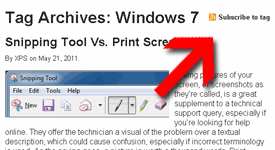
A while back, I adjusted the Feeds List page with basic directions on how to find the RSS feed of a specific category, tag, or author. That would allow readers to subscribe to a specific listing of their choice rather than the whole site feed. While doing that, I had […]
Posted in: Web Development
Tagged: code, HTML, PHP, RSS feed, syntax, web, web development, WordPress
Add Users Total To WordPress Dashboard
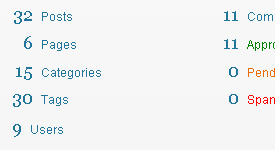
The WordPress Dashboard is the first thing you see when you login. The “Right Now” box has important information like the total number of posts tags, comments, etc. but one thing is missing: users. I usually don’t have a need to check the Users list, so when a number of […]
Disable WordPress Drafts & Revisions

Today’s computer tech tip involves disabling two features in WordPress: Automatic Drafts & Revisions. They’re intended to be helpful, but they’re not for everyone. I would prefer to see these as options to enable/disable within the Admin Dashboard, but hard-coding the changes will suffice for now. I may have mentioned […]
Don’t Count Administrators In WordPress.com Stats Plugin
The WordPress.com Stats plugin is great for tracking page-views of your visitors. You can see the top posts and pages, the incoming referral links and search terms, and the outbound links to where your visitors left. As the Administrator, you have two options available for modification. You can choose to: […]
Posted in: Web Development
Tagged: code, PHP, plug-in, stats, syntax, web, web development, WordPress
Hide WordPress Version From Dashboard Footer
Hiding your WordPress installation version is a good idea. Knowing what version you’re running, a malicious person could take advantage of the vulnerabilities identified within that version and potentially corrupt, delete, or even control your WordPress installation and all your web host files. Why some theme developers decide to advertise […]