
Tag Archives: PHP
Disable Automatic Paragraphs & Line-breaks In WordPress Posts

I’ve mentioned previously that I prefer handwriting code instead of having it done automatically. When I code manually, I get the functionality and presentation exactly the way I want. One such feature in WordPress (I’ve disabled so many) counters my preference by doing something automatically. What I’m referring to is […]
Posted in: Web Development
Tagged: application, code, disable, HTML, PHP, syntax, web, web development, WordPress
Introduction To PHP Include & Require
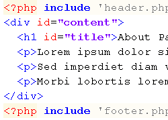
The PHP Include function is used to pull different pages together into one. For example, a default header, menu, and footer can be included on multiple content pages. When you want to update the menu, you only need to update a single file. Then the changes are reflected on all […]
Posted in: Web Development
Tagged: code, CSS, HTML, lorem ipsum, Notepad++, PHP, sample text, syntax, text editor, web, web development
RSS Links In Archive-type Pages
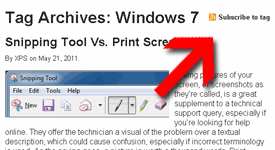
A while back, I adjusted the Feeds List page with basic directions on how to find the RSS feed of a specific category, tag, or author. That would allow readers to subscribe to a specific listing of their choice rather than the whole site feed. While doing that, I had […]
Posted in: Web Development
Tagged: code, HTML, PHP, RSS feed, syntax, web, web development, WordPress
Add Users Total To WordPress Dashboard
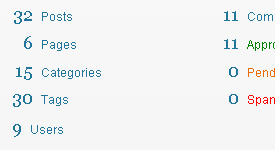
The WordPress Dashboard is the first thing you see when you login. The “Right Now” box has important information like the total number of posts tags, comments, etc. but one thing is missing: users. I usually don’t have a need to check the Users list, so when a number of […]
Disable WordPress Drafts & Revisions

Today’s computer tech tip involves disabling two features in WordPress: Automatic Drafts & Revisions. They’re intended to be helpful, but they’re not for everyone. I would prefer to see these as options to enable/disable within the Admin Dashboard, but hard-coding the changes will suffice for now. I may have mentioned […]
Don’t Count Administrators In WordPress.com Stats Plugin
The WordPress.com Stats plugin is great for tracking page-views of your visitors. You can see the top posts and pages, the incoming referral links and search terms, and the outbound links to where your visitors left. As the Administrator, you have two options available for modification. You can choose to: […]
Posted in: Web Development
Tagged: code, PHP, plug-in, stats, syntax, web, web development, WordPress