
Tag Archives: code
Blocking Semalt Web Crawler

The Semalt.com web crawler is useless. The services they claim to provide (if you pay) offer no better analysis on your website than the free ones you’re already using. Semalt also uses a persistent web crawler, which inflates your web statistics, ignores Robots.txt protocols, and even ignores their own Website […]
Disable Automatic Paragraphs & Line-breaks In WordPress Posts

I’ve mentioned previously that I prefer handwriting code instead of having it done automatically. When I code manually, I get the functionality and presentation exactly the way I want. One such feature in WordPress (I’ve disabled so many) counters my preference by doing something automatically. What I’m referring to is […]
Posted in: Web Development
Tagged: application, code, disable, HTML, PHP, syntax, web, web development, WordPress
Updating From xHTML To HTML 5

If you haven’t already, now is a great time to update your website code to HTML 5 web standards. Here are a handful of things you can do to really get the ball rolling. Table Of Contents Document Type Self-closing tags Language & Character Set Default MIME Types Attribute Minimization […]
Move Twitter Tweets To The Left

Not long ago, I wrote an article describing how to move Facebook’s timeline to the left of the menu. I’ve come to prefer content on the left and judging by that article’s view statistics, I’m not the only one. Today’s computer tech tip will do the same thing to Twitter […]
Introduction To PHP Include & Require
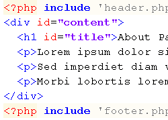
The PHP Include function is used to pull different pages together into one. For example, a default header, menu, and footer can be included on multiple content pages. When you want to update the menu, you only need to update a single file. Then the changes are reflected on all […]
Posted in: Web Development
Tagged: code, CSS, HTML, lorem ipsum, Notepad++, PHP, sample text, syntax, text editor, web, web development
Move Facebook Timeline Back To The Left

Facebook is at it again. This time changing the layout and color scheme of the profile page. The new, gray, decaying color scheme is more accurate to the product than they realize. Moving the timeline to the right of your about information was a bad move since that’s the content […]