
Author Archives: Xps
Create A Custom Default WordPress Avatar

Inside the Discussion Settings area of your WordPress blog, there are seven options for default avatars. The option you select will show up for every user who hasn’t setup a Globally Recognized Avatar for their email address. That is, of course, if you’ve adjusted the Avatar Display option to Show […]
Installing SUPERAntiSpyware Free 5.0
I mentioned in a recent article that Malwarebytes Free is my favorite anti-malware program. SUPERAntiSpyware is pretty darn good, and in some ways superior to Malwarebytes. As both programs provide “on-demand” protection, I have both installed and always follow a Malwarebytes quick scan with one from SUPERAntiSpyware. Today’s computer tech […]
Don’t Count Administrators In WordPress.com Stats Plugin

The WordPress.com Stats plugin is great for tracking page-views of your visitors. You can see the top posts and pages, the incoming referral links and search terms, and the outbound links to where your visitors left. As the Administrator, you have two options available for modification. You can choose to: […]
Posted in: Web Development
Tagged: code, PHP, plug-in, stats, syntax, web, web development, WordPress
Add Recycle Bin To Start Menu Or Taskbar
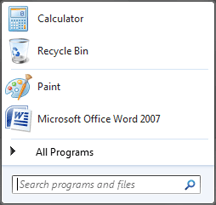
In a recent support query, I was asked about creating a shortcut for the Recycle Bin in the Start Menu. This client wanted a clean Desktop to show off their wallpaper but didn’t want to lose this important tool. Today’s computer tech tip will do just that and works for […]
Installing Malwarebytes’ Anti-Malware Free

Malwarebytes’ Anti-Malware Free is my favorite program to remove “malware” (the umbrella term for viruses, spyware, rootkits, etc.). Running a full system scan with Malwarebytes (for short, also known as MBAM) is my first suggestion whenever I believe malware may be the cause of a computer problem, or when a […]
Hide WordPress Version From Dashboard Footer
Hiding your WordPress installation version is a good idea. Knowing what version you’re running, a malicious person could take advantage of the vulnerabilities identified within that version and potentially corrupt, delete, or even control your WordPress installation and all your web host files. Why some theme developers decide to advertise […]